




Works great
- A sketch or drawing of the part you want
- A photo of a broken piece you need to replace
- A logo or silhouette to emboss, cut, or turn into a badge
- A photo of a pet or object to sculpt as a figurine
Drop in a photo, a sketch, or a reference and describe the part. GrandpaCAD generates a printable, editable 3D file, not a messy scan you can never change.
Commencez gratuitement - Aucune carte de crédit requise
En réflexion...
"Image to 3D" means two different jobs, and most tools only do one. GrandpaCAD reads your image and picks the right engine: parametric CAD for parts, organic sculpting for characters. You can also just tell it which one you want.
Sketch to CAD
Sketch the part on paper, photograph it, and give the dimensions in chat. The AI compiles a parametric model with real millimetres: threads, chamfers, clearances. This is image to 3D CAD, not a traced outline.
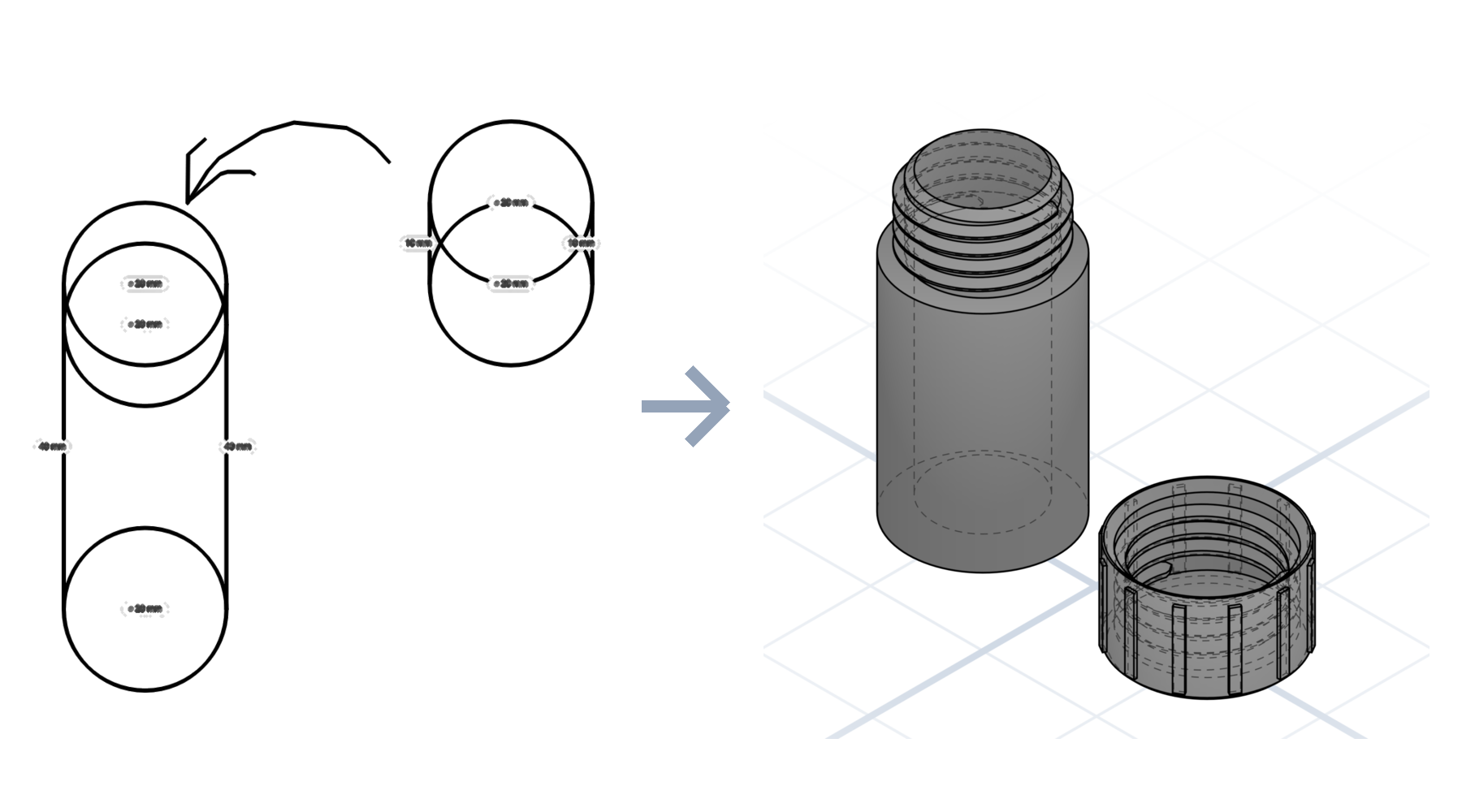
Photo to organic
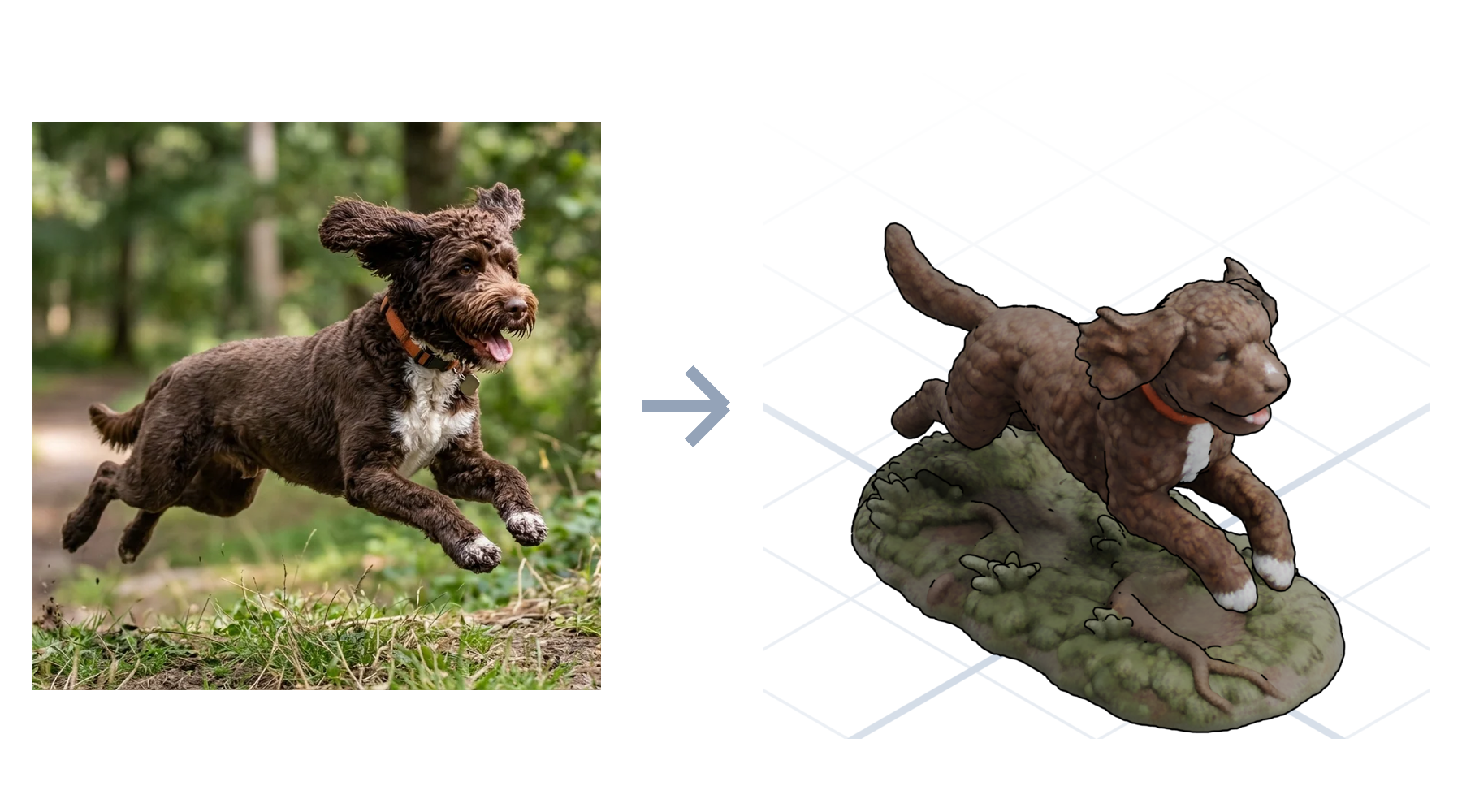
Turn a picture into a 3D model of the sculpted kind: a photo of your dog becomes a printable figurine with color regions already segmented for a multi-material printer. No sculpting, no manual painting.
How it works
A sketch, a photo, a spec drawing, or a logo.
Give the dimensions and the fit; the AI builds to match.
Adjust any dimension with a slider, then download and print.
What to expect
Most "image to 3D" tools hand you a lumpy mesh you can't edit and can't print cleanly. GrandpaCAD reads your image for intent, then generates a real model you can keep adjusting in plain English until it fits.
The differentiator
Photogrammetry and mesh generators produce geometry that is frozen the moment it lands. GrandpaCAD output stays live: change the hole spacing, thicken a wall, or resize the whole part with a sentence, and the geometry rebuilds cleanly.
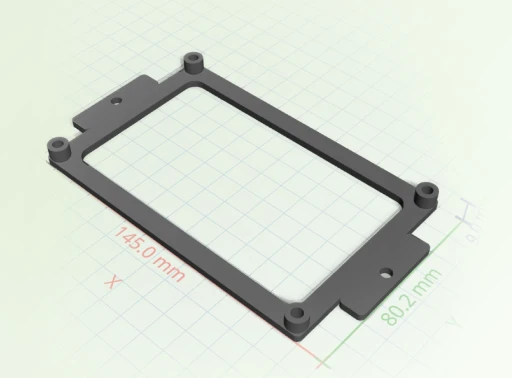
Most image-to-3D tools optimize for game assets. We optimize for parts you actually print and can edit later.
 GrandpaCAD GrandpaCAD | Photogrammetry apps | Mesh AI generators | |
|---|---|---|---|
| Output | Editable parametric model | Dense static scan | Un-editable mesh |
| Print-ready | Watertight, slices clean | Needs heavy repair | Often non-manifold |
| Change it later | One sentence | Re-scan the object | Start over |
| Input needed | One image plus a sentence | Dozens of photos | A text prompt only |
Open any model in the public library and tell the AI what to change. No account needed to look around.
Apprécié par les makers
Retours non modifiés issus de l'invite d'évaluation dans l'application. Nous n'affichons que le pays pour préserver l'anonymat des makers.
"generated a printable design on the first try!"
"Fast easy and good quality"
"It's working good. Grandpa!"
"yay so fun"
Extraits de véritables réponses aux enquêtes CSAT dans l'application GrandpaCAD.
Cet outil a été créé pour mon grand-père qui adore l'impression 3D mais a du mal avec les logiciels de modélisation complexes. Il ne parle pas anglais, ce qui rend la plupart des outils de conception 3D inaccessibles pour lui.
Malgré ces défis, il est passionné par la création d'impressions 3D pour notre famille. Il utilise son imprimante BambuLab A1 et peut désormais facilement créer des modèles personnalisés en décrivant simplement ce qu'il souhaite.
Lire son histoire
Tous les forfaits génèrent les mêmes modèles avec la même qualité. La différence réside dans le nombre de modèles que vous générez et le niveau de contrôle souhaité. Modifier un modèle terminé avec les curseurs ne compte jamais comme une génération.
Juste pour vous faire une idée. Le résultat est d’une qualité identique à celle de tous les forfaits payants.
Pour un seul projet. Un nombre fixe de générations, sans frais récurrents.
Pour les utilisateurs avancés qui veulent la plateforme complète et plus de générations qu’ils n’en utiliseront vraisemblablement.
Yes. Drop in a photo and GrandpaCAD generates a sculpted, full-color model from it. It works best when the subject is clear: a pet, a character, an object on a plain background. You get a watertight mesh that slices without repair.
Upload the sketch, then describe the part and its key dimensions in the chat. The AI reads the shape from your drawing and compiles a parametric model to the millimetres you give it. Every dimension stays adjustable afterward.
Yes, and that's the point. Parametric parts expose every measurement as a slider, and any model can be changed by asking in plain English: make it taller, add a hole, thicken a wall. Tweaking never costs a generation.
STL, 3MF, OBJ, GLB, and GLTF. The 3MF loads 1:1 in Bambu Studio, PrusaSlicer, and Orca, with multi-color models already split into filament regions.
You get 3 free generations with no credit card, at the same output quality as every paid plan. After that, credit packs start at $12 and subscriptions at $24 a month.
3 free models, no credit card. See what the AI makes of your first image.