How GrandpaCAD works: describe, inspect, refine
You describe a part in a chat. An AI agent builds it as a real 3D model, looks at what it built and fixes what's off. You check it in the viewer, change what you want with a slider or another message, and download an STL or 3MF for your slicer. The first version usually shows up in about two minutes (a complicated part can take ten).
That's the whole loop. Here it is on one real part, start to finish.
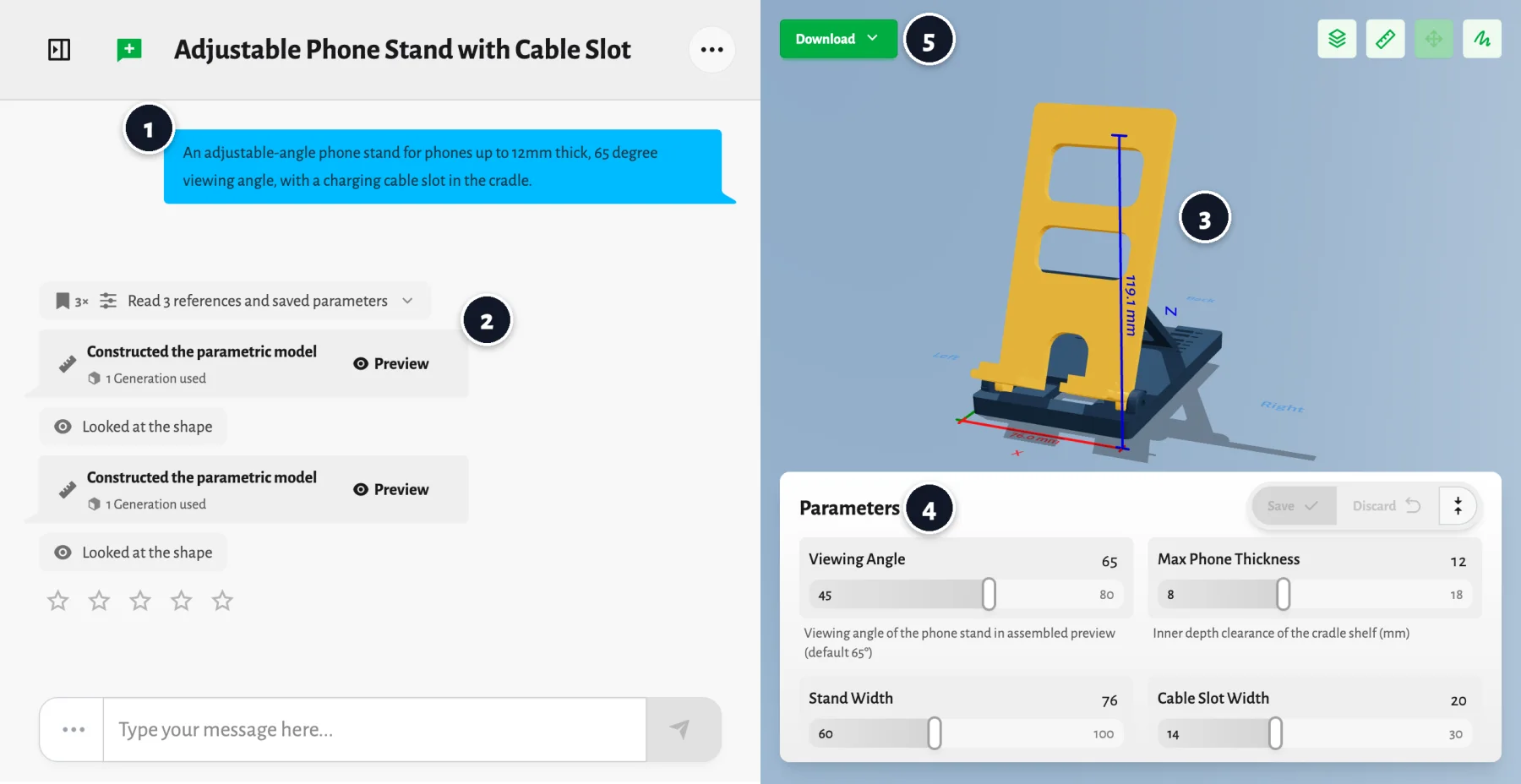
Everything on that screen came from one message. The numbers are the steps this post walks through:
- You describe the part.
- The agent builds it and checks its own work.
- You inspect the model at its real size.
- You refine it with sliders or another message.
- You download the file and print it.
1. Describe the part
The phone stand started as this:
An adjustable-angle phone stand for phones up to 12mm thick, 65 degree viewing angle, with a charging cable slot in the cradle.
No CAD words in there. It's what you'd tell a friend who's handy with CAD, plus the three things only you know: what it has to fit (a phone up to 12 mm thick), the number you care about (65°) and the feature you need (a slot for the cable). The agent picks everything else and tells you what it picked.
"A phone stand" works too. You just get the agent's idea of a phone stand: its angle, its width, its guess at how thick your phone is. Every number you add is one less guess, and these are the ones that usually matter:
- What it holds or attaches to: "a 25 mm pipe", "an M3 screw", "a Raspberry Pi 5". For known hardware it looks up the real dimensions itself.
- Sizes you'd measure with calipers. The agent can't see your desk.
- Features: holes and how far apart they are, slots, text, how many filament colors.
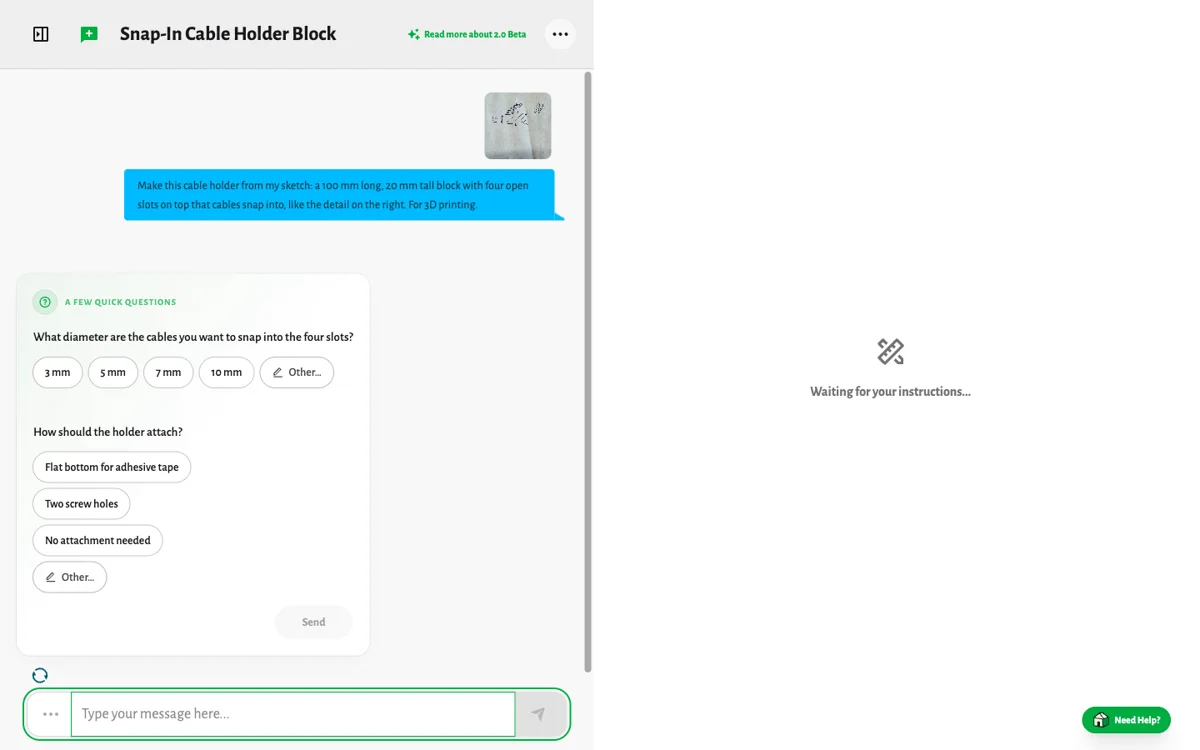
If something important is missing, it asks before it builds, with a few answers you can tap:
Words aren't the only way in, either. You can drop in a photo, a napkin sketch, a technical drawing, or an STL, 3MF, OBJ or GLB you want changed. The image to 3D post shows each of those on real runs.
2. The agent builds it and checks it
While you wait, the agent's steps show up in the chat. Here's the phone stand run up close:
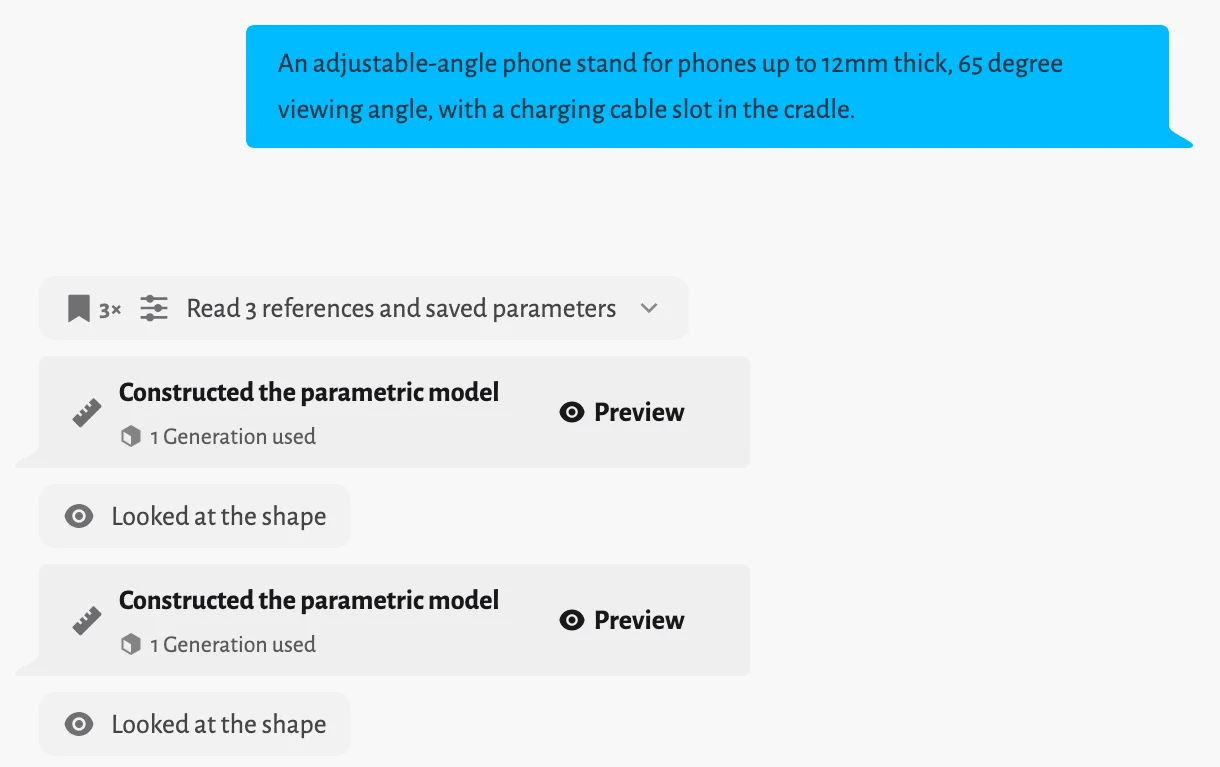
First it read three references. Those are its notes for this kind of part, and it has about twenty of them: what a 0.4 mm nozzle can and can't print, how to tilt a cradle on a base so the pieces don't cut into each other, snap-fits, hinges, threads, Gridfinity, engraved text, rigging. Then it saved parameters, which means it picked the numbers you'll probably want to change later and gave each one a range that still makes a working stand.
"Constructed the parametric model" is where it wrote CAD code and ran it. That's the part that matters most: the stand is a program, not a mesh an AI imagined. The 65° is 65°, the 12 mm cradle is 12 mm, and every one of those numbers stays editable.
"Looked at the shape" is the agent checking its own work. It rendered the stand from several angles, looked at the pictures, and checked the size and whether the mesh is watertight and manifold (the two things slicers complain about). After the first look it changed something, built the stand again and looked a second time before it handed it over. You'll see that a lot. Each build has a Preview button, so you can flip back to any earlier version.
3. Inspect it yourself
The model opens in the viewer next to the chat. Spin it, zoom in, look underneath. The dimension lines show the real size: this stand is 119.1 mm tall and 76 mm wide, and that's what comes off your print bed. The ruler measures between any two points you click, the view menu has a section view and an exploded view for parts with insides, and Model info tells you whether the mesh is watertight and manifold.
If something looks off, say what and where. "The cable slot is too close to the left edge" gives the agent something to fix. "It's wrong" doesn't.
4. Refine it
There are two ways, and most people end up using both.
Move a slider
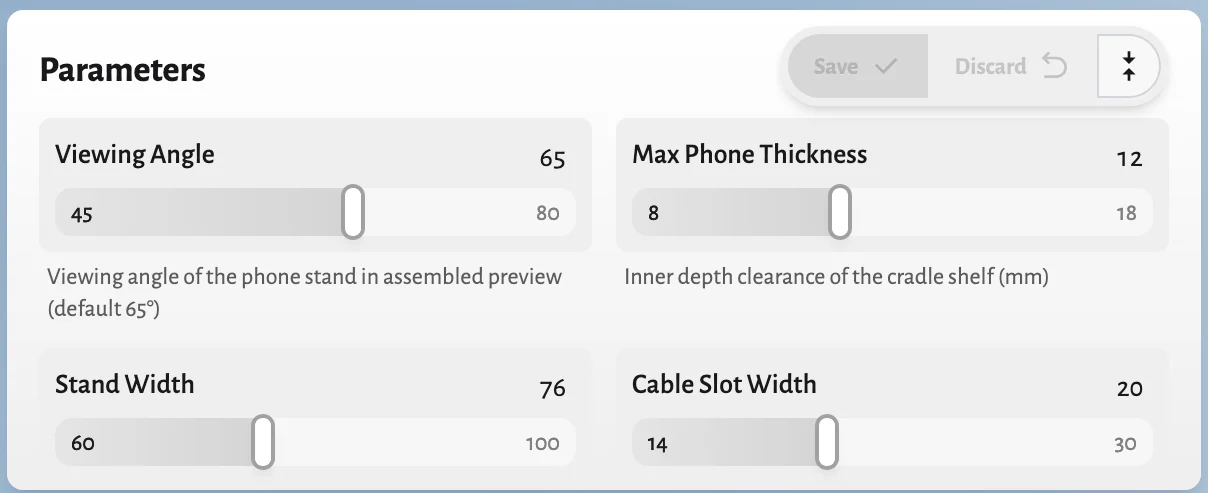
The agent turned the numbers that matter into sliders: viewing angle from 45 to 80°, phone thickness from 8 to 18 mm, stand width from 60 to 100 mm, cable slot from 14 to 30 mm. Drag a few, press Save, and the model rebuilds in a few seconds. Discard puts them back. Sliders never use a generation, so try as many combinations as you like.
Ask for it
For anything a slider doesn't cover, write it: "add a lip at the front so the phone can't slide off", "make the base 20 mm deeper", "round every outside edge". The agent knows what it just built, so you only say what changes and it leaves the rest alone. Each new build uses one generation, and the chat shows that under the build.
5. Download and print
The Download button gives you STL, 3MF, OBJ or GLB, converted right in your browser. STL is the one every slicer opens. 3MF also keeps the colors as separate parts, so a two-color nameplate opens in Bambu Studio, PrusaSlicer or Orca with the letters already split from the base, ready for a second filament. GLB is for game engines and Blender.
Not just brackets: a sculpted character
Some things don't have dimensions you could write down: a dog, a dragon, a carnival costume. For those the agent sculpts instead of constructing. Same chat, same steps, a different tool.
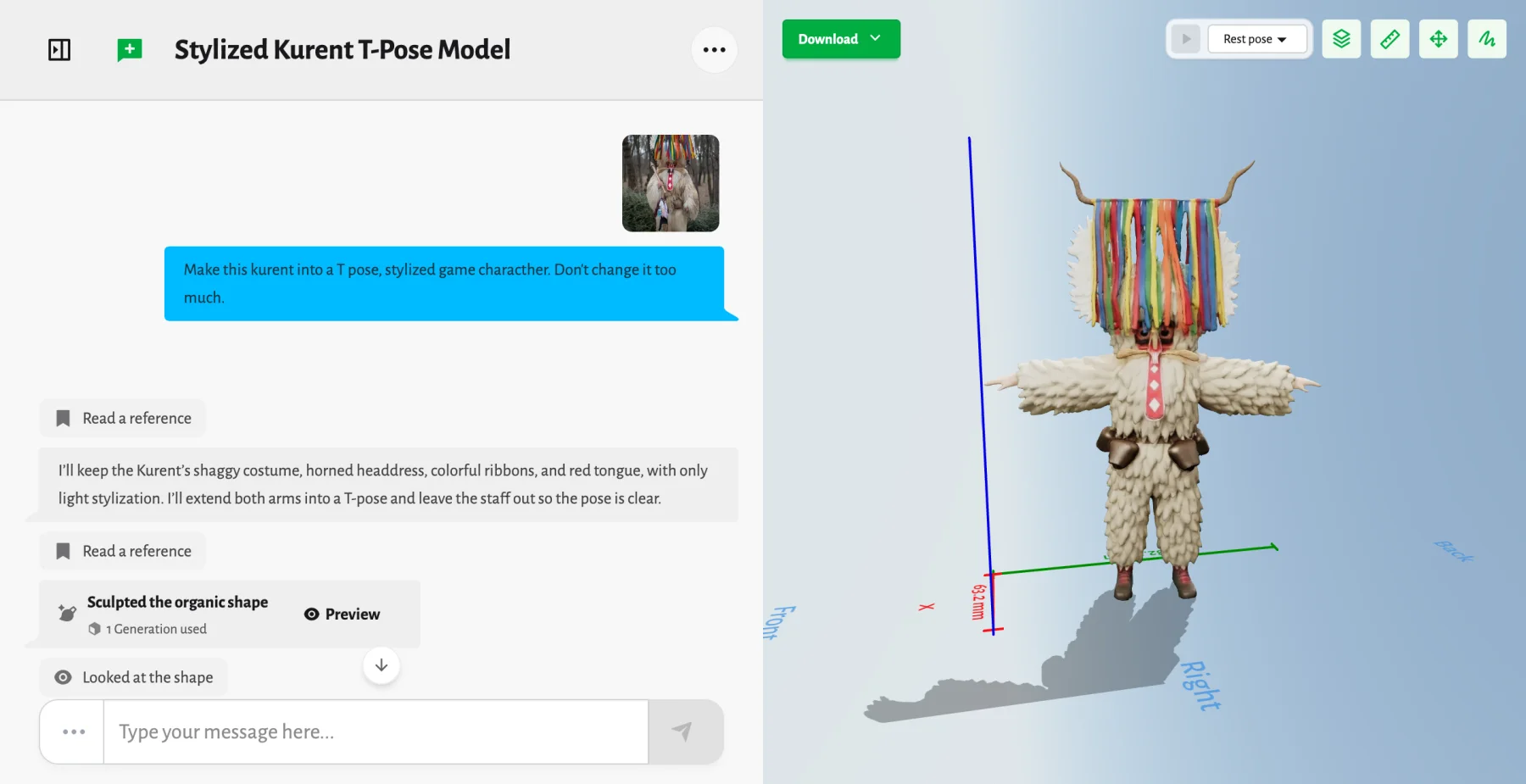
That's a kurent, the sheepskin monster that chases winter away at Slovenian carnival. I attached a photo and wrote "Make this kurent into a T pose, stylized game character. Don't change it too much." The agent read its notes and said what it would keep (the shaggy costume, the horned headdress, the ribbons, the red tongue) and what it would change (arms out into a T-pose, and the staff left out so the pose reads clearly). Then it sculpted the figure and looked at the result. It came back in color, as one solid model.
The T-pose isn't just for show. It's the pose a character needs before it gets a skeleton, so the next message can be "rig it and make it dance" and the agent adds the bones and the motion. The rigging post shows what that looks like.
You never pick a mode. A part with numbers gets constructed, a creature gets sculpted, and a figurine on a threaded base gets both in the same chat.
What's in the agent's toolbox
GrandpaCAD isn't one AI model that spits out a file. It's a frontier AI model sitting in a workshop full of real tools, deciding which one to pick up, in what order, and when the result is good enough to show you.
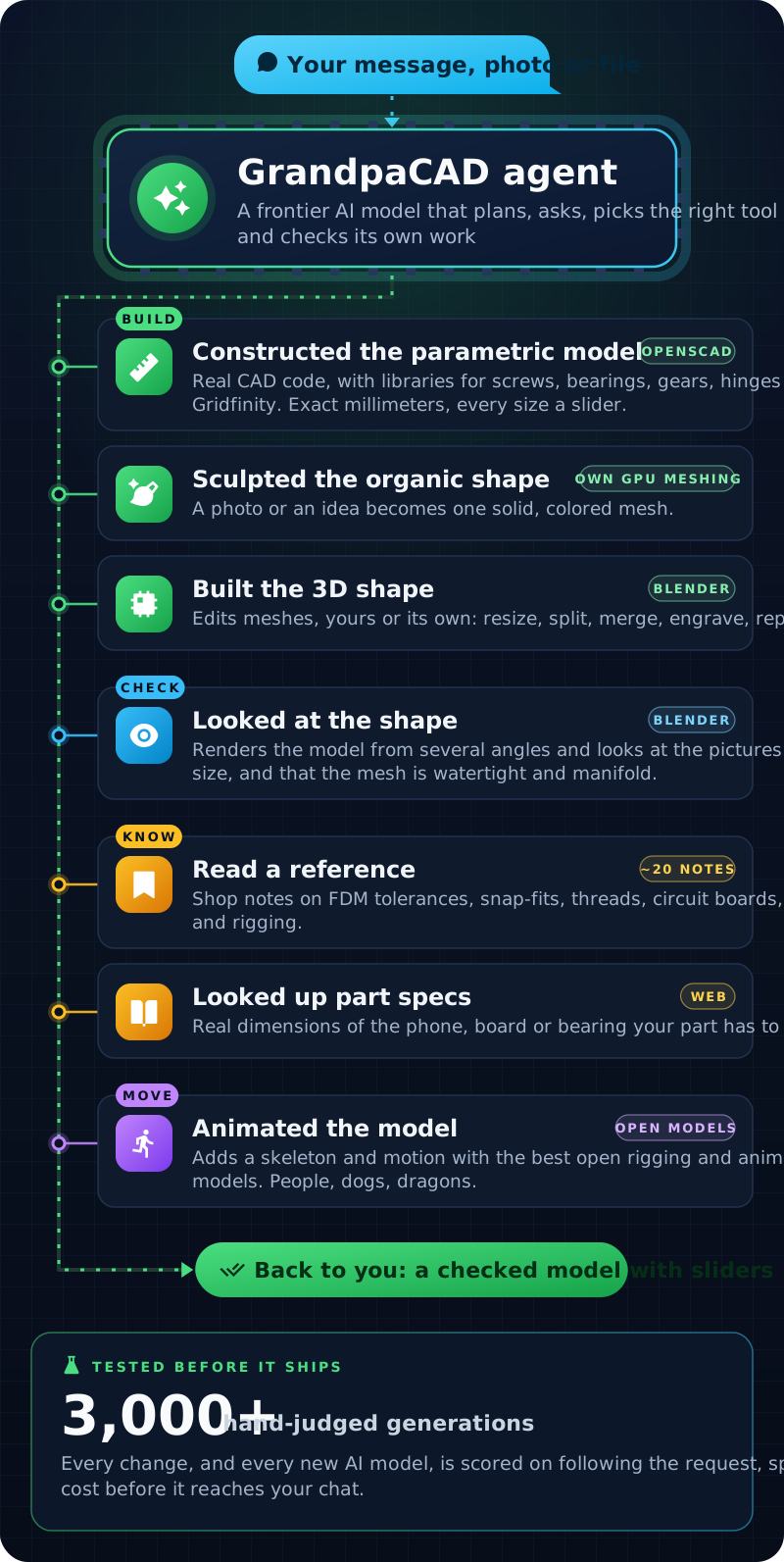
The CAD side is OpenSCAD with the libraries makers already rely on (BOSL2, NopSCADlib, Gridfinity Rebuilt), which is why a hole for an M3 screw comes out the size of an M3 screw instead of something close. The mesh side is Blender, for editing files and for rendering the agent's own work so it can look at it. Sculpted shapes go through GPU meshing I built for this, which turns a picture into one solid, colored model a slicer accepts. Rigging and animation use the best open models there are. The reference notes come from failed builds: when the agent gets something wrong in a way that repeats, the fix goes into a note.
None of that ships on a hunch. I test every change against more than 3,000 generations I've judged by hand, scored on how well it followed the request, how long it took, how good it looks and what it cost. New AI models go through the same test before they get anywhere near your chat. How we test the agent has the details, and the changelog shows how often things change.
What it's good at (and what it isn't)
It's good at:
- Functional prints: stands, mounts, brackets, clips, hooks, enclosures, organizers, Gridfinity bins, knobs, replacement parts you can measure.
- Text and multi-color: nameplates, tags, signs, labels.
- Figurines, busts and game characters from a photo or a description.
- Changing a file you already have: resize it, split it to fit your bed, add your name, fix a broken mesh.
It takes a few rounds for:
- Parts that have to fit each other, like hinges, lids and threads. They work, but print a small test piece first.
- Copying a part you can only describe vaguely. Measure it and give it the numbers.
It doesn't do:
- STEP files. You get a mesh (STL, 3MF, OBJ or GLB). The editable version of the part lives in the chat, as its sliders and the conversation.
- Engineering checks. It won't tell you whether a bracket holds 20 kg.
What it costs
New accounts get three generations, no card needed. One generation is one build, so each "Constructed" or "Sculpted" step in the chat uses one, and a message can use two if the agent rebuilds (like the phone stand above did). Sliders are free. Downloading the file needs a pack, from US$12, or a plan. The pricing page has the details.
Try it
Pick an example or describe your own part.
And if you're wondering about the name, here's the grandpa behind it.





